You send the couple a link to the gallery. An hour later, it's in the family chat, that evening it's with the bridesmaids, and a week later, Aunt Linda forwards it to her neighbor. That's how it should be: the film was made to be watched.
Watched, yes. But downloading the original 4K film and the full archive of photos in full quality is something the couple needs first and foremost. Not every guest who once opened the link.
Until now, the choice was simple: either the entire gallery was open, or the entire gallery was password-protected. Now OurStoria offers a third option: everyone can view, but only those you've given the password can download. This applies separately to photos and videos.
In this article, we'll explore the new Privacy tab, show what a download password looks like to a guest, and walk through four scenarios in which it's useful.
What's new: Privacy tab
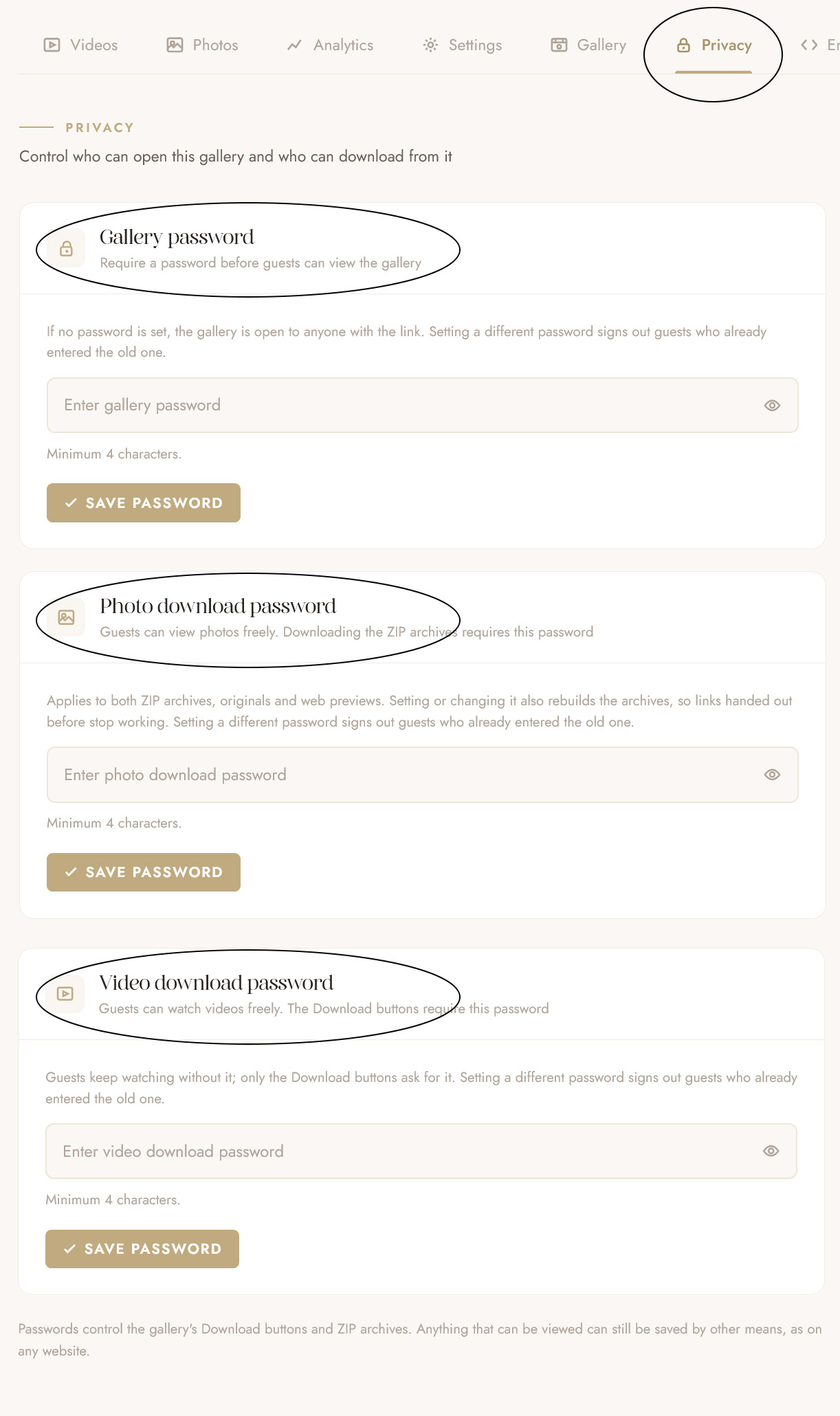
Each project now has a Privacy tab. It holds three passwords, and each one locks something different:
| Password | What it locks | Who it's usually given to |
|---|---|---|
| Gallery password | The entire gallery: without it, the guest can't see either the video or the photos | Anyone who should be viewing |
| Photo download password | Photo downloads - both ZIP archives: originals and web versions | The couple |
| Video download password | Download buttons for videos | The couple |
Passwords are independent. You can set a password only for video downloads and leave everything else unlocked. You can lock everything with three different passwords. You can also use the same password in two cards.
The gallery password used to be located in the Gallery tab, but it's now moved to Privacy. If you already had one, you don't need to do anything; it will continue to work as before.
This tab is available on all plans, including the trial period. One caveat: during the trial, downloads are disabled entirely in galleries, so you can set a download password in advance, and it will take effect when you subscribe.
How it looks for a guest
The guest opens the gallery and sees it in its entirety: the film plays, the photos can be browsed, nothing is hidden.
The difference only appears when they click Download. In the download window, a locked section has a short banner instead of buttons: "Downloading videos requires a password," a hint "Ask your videographer for the download password," and a password field.
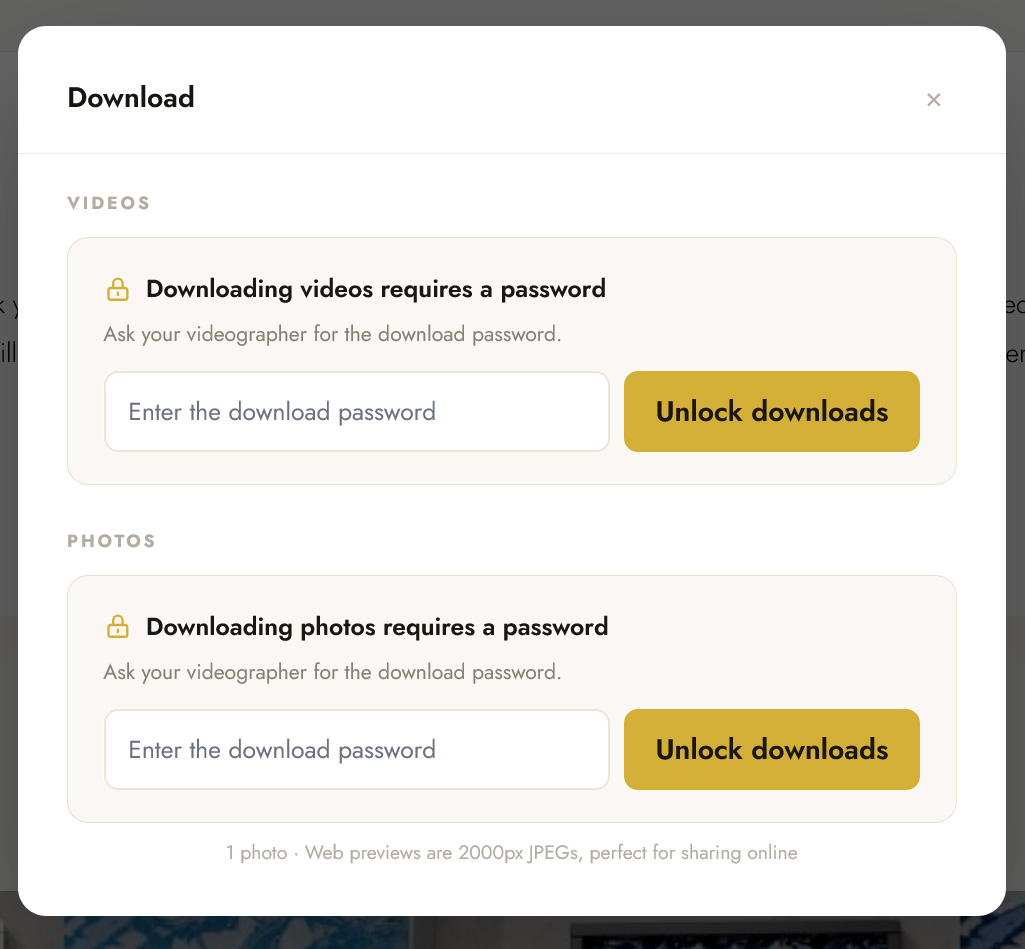
The guest enters the password, and the section immediately transforms into regular download buttons, without reloading the page.
The password is remembered: while the guest is using the gallery, they don't need to enter it again. Photos and videos are unlocked separately—the video password doesn't unlock the photo archive, and vice versa.
All guest-facing text is translated into the gallery's 8 languages, so a couple from Madrid or Bucharest will see it in their own language.
How to set it up
- Open a project and go to the Privacy tab.
- In the desired card — Photo download password or Video download password — enter a password (4 to 100 characters).
- Click Save Password.
Done. A Downloads locked badge will appear in the project header, and a summary of what is currently open and what is password-protected will appear in the right column of the tab.
You can remove the password by clicking the Remove button in the same card. Before removing it, OurStoria will ask for confirmation and indicate what will change: for example, that everyone who can open the gallery will be able to download videos again.
Four scenarios
1. The whole wedding watches, the couple downloads
The most common scenario. Emily and Jake want all the guests to watch the film, so they send out the link themselves. But they want to keep the archive with 600 full-resolution photos for themselves.
Don't set a gallery password, but set a photo download password and give it only to the couple. Guests view and scroll, while the couple downloads.
2. Download after final payment
Many studios take the final payment upon delivery. With a download password, you can handle this gently: the couple receives the gallery immediately, watches the film, shows it to their parents, and you send the download password along with the payment receipt.
No low-res previews or watermarks—the couple sees the finished work in its entirety. They just download the files a little later.
3. Photos are open, but the film is not
The opposite can happen: guests can download as many photos as they like, but the couple wants to keep the full film to themselves. Set a password only for video downloads. Photo archives remain open, but the Download buttons for the film require a password.
4. Closed gallery before the premiere
If a couple wants to watch the film privately first—for example, together for an anniversary—set a gallery password. Without it, the guest won't be able to see anything at all. After the premiere, the password can be removed with a single click, but the download passwords remain in place.
Password can be viewed again
Six months later, the couple writes: "We lost the download password, can you send it to us?" Until now, the only option was to set a new one. Now, the password card has a Show button—the saved password can be viewed and forwarded.
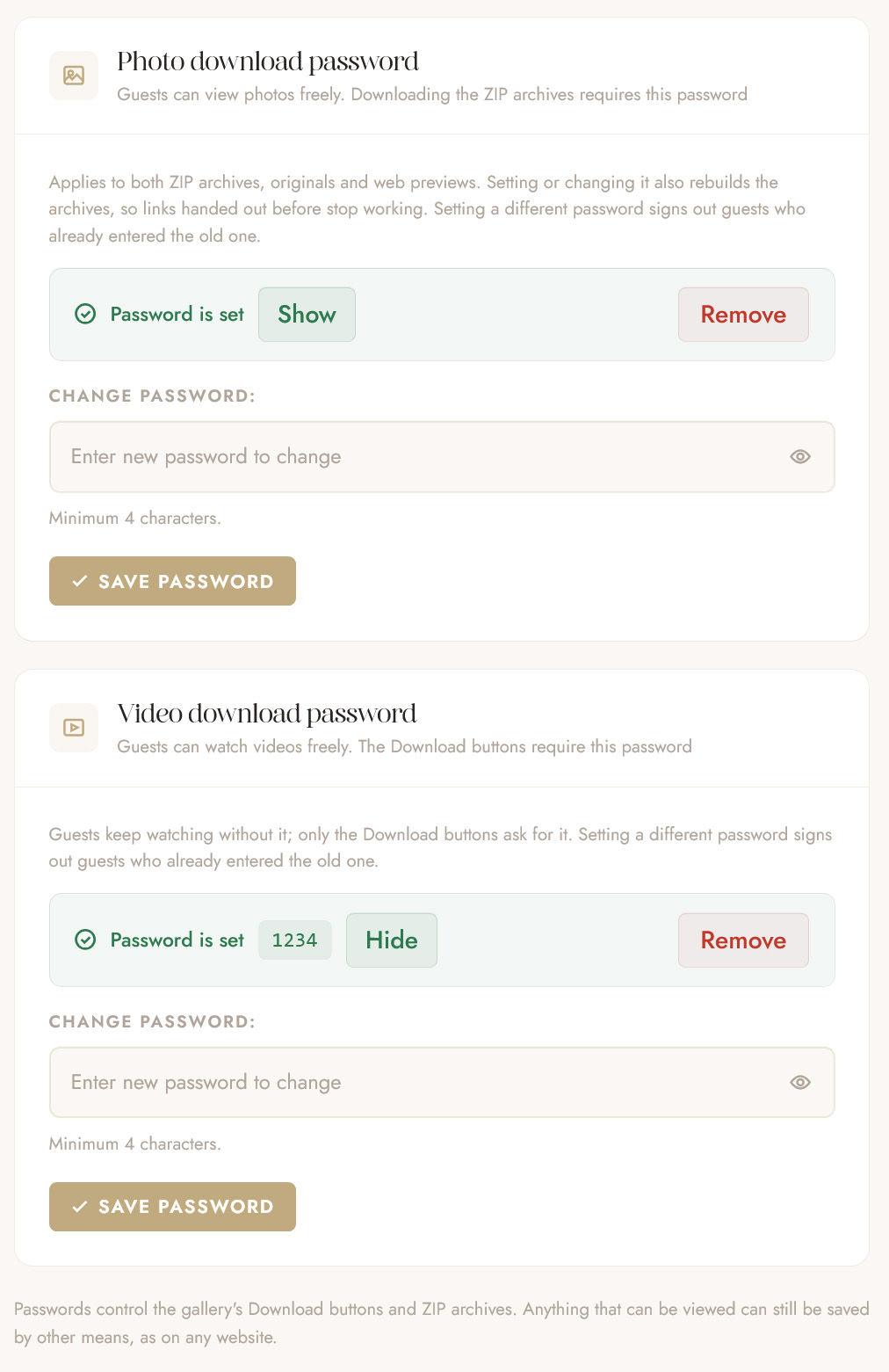
Gallery passwords set before this update cannot be viewed: they were stored in a way that makes them unreadable. Such a card will contain a hint—just enter the same password again once. Guests who have already entered this password will stay in the gallery.
What happens when you change your password
A new password signs out everyone who entered the old one. If you set a different password—for the gallery or downloads—guests who entered the old one will have to enter the new one. This is handy if the password ended up with the wrong people.
Re-saving the same password does not sign anyone out. To revoke access, you need a different password.
Old links to the photo archive stop working. When a guest downloads the photos, they receive a temporary link to the ZIP archive. When you set or change a photo download password, OurStoria rebuilds both archives under new names, and the previously issued links stop working. The new archive will be built automatically, and if a guest clicks the button before then, the build starts right away—once they've entered the password.
Embedded galleries and Safe Archive
Download passwords also work in galleries embedded on your website—the guest enters the password directly within the embedded gallery, without having to go to OurStoria.
In Safe Archive projects, the download page also asks for a password: a password field appears above the video list and in place of the photo archive button; once it's entered, the downloads open.
Safe Archive is now on the Settings tab
To make room for Privacy, we've removed the Archive tab. All archive management—plan selection, archiving, renewal, and unarchiving—is now in the Safe Archive section of the project's Settings tab, right below the project details. It functions the same as before.
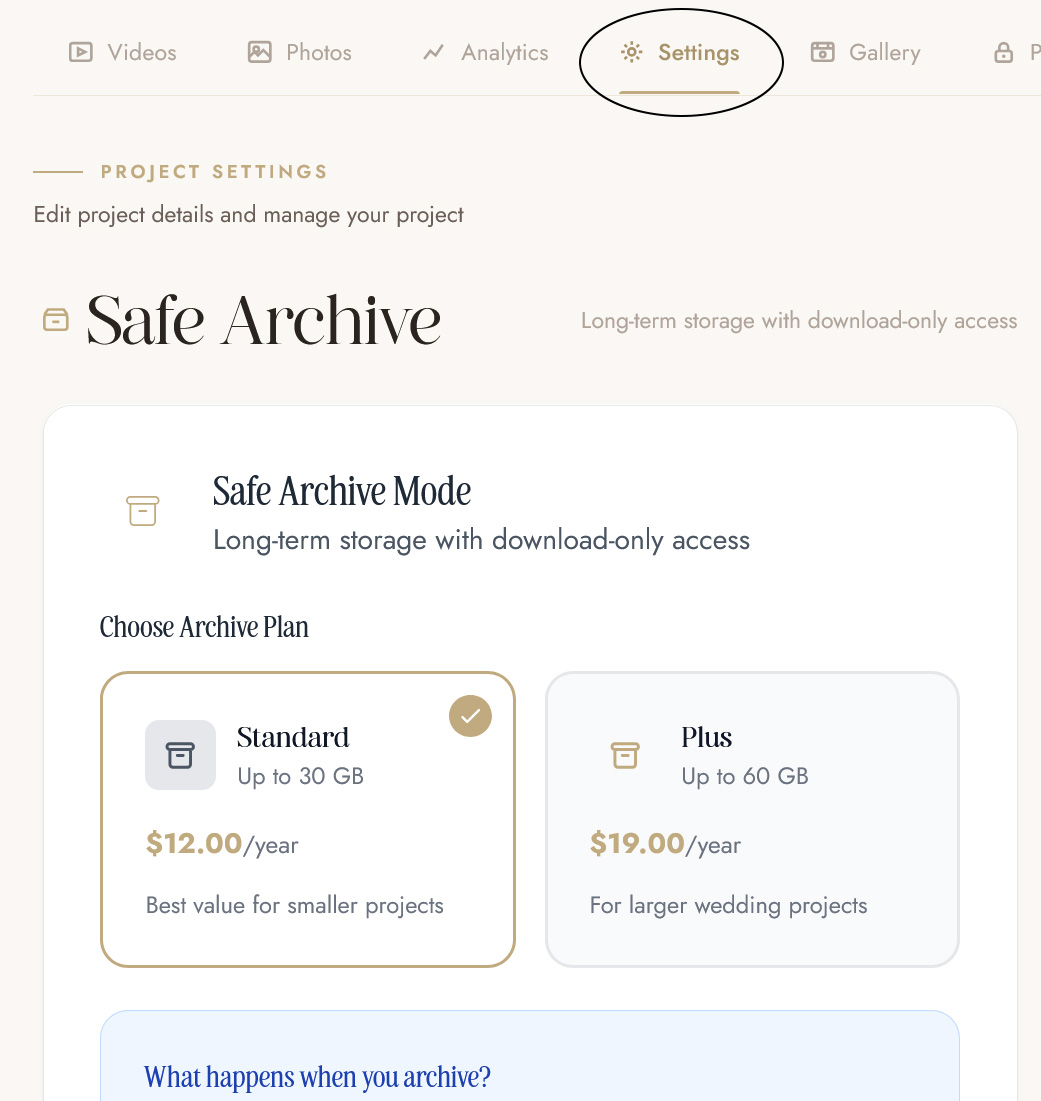
Old links, bookmarks, and archive renewal reminders will automatically redirect to the new location.
What changes for galleries you've already shared
Nothing changes until you set a download password yourself. Galleries you've already shared will work as before: everything that was open remains open.
One small note: if a gallery has a gallery password, guests may be asked to re-enter it once after this update. This is normal—the password is the same, and there's no need to change it.
What a password protects and what it doesn't
The download password controls the Download buttons and gallery ZIP archives. Everything that can be viewed can be saved in other ways, just like on any website. For the vast majority of visitors, the Download button is how they download, and it's now the one that asks for a password.
Summary
Previously, the gallery had two modes: open or closed. Now there are as many as you and the couple need: the film for everyone, originals for the couple, download after payment, or a private premiere.
Open any project, go to the Privacy tab, and set a password in the appropriate card. If you don't use OurStoria yet, try it for free – the tab is available from day one.
Related articles: